

The era of searching for a single “magic” AI tool is officially over. In 2026, the most successful professionals and teams have realized that the true power of artificial intelligence lies not in individual applications, but in how those applications are orchestrated into a cohesive AI productivity stack. This shift represents a move away from fragmented experimentation toward integrated systems where tools share context, automate handoffs, and act as a unified extension of human intent. Building an effective AI productivity stack is no longer just about choosing the smartest model; it is about creating a workflow where the strengths of one tool compensate for the limitations of another.
As we navigate this new landscape, the distinction between “software” and “teammates” continues to blur. The tools in a modern AI productivity stack are increasingly agentic, meaning they do not just wait for prompts but actively monitor your environment, anticipate your needs, and execute complex multi-step tasks across different platforms. By selecting the right combination of LLMs, research engines, knowledge hubs, and automation layers, you can build a system that saves dozens of hours every week while significantly raising the quality of your output.
This guide explores the ten essential tools that form the definitive AI productivity stack for 2026. We will examine why these specific tools were chosen, how they function within a broader system, and—most importantly—how they work better together to solve the most common friction points in the modern knowledge worker’s day.
The Reasoning Layer: ChatGPT and Claude
At the heart of every AI productivity stack is the reasoning layer. These are the general-purpose models that handle the bulk of your cognitive work, from brainstorming and strategic planning to drafting and complex problem-solving. In 2026, the two dominant players in this space, OpenAI’s ChatGPT and Anthropic’s Claude, serve different but complementary roles. ChatGPT remains the ultimate multi-modal generalist, capable of processing advanced voice commands, vision-based tasks, and massive datasets with unparalleled speed . It is the “command center” of the stack, often serving as the primary entry point for new ideas or high-level project outlines.
Claude, on the other hand, has become the specialist of choice for writing and technical reasoning. Its “Artifacts” feature allows users to see code, documents, and interactive prototypes come to life in a dedicated side panel, making it indispensable for collaborative creation. Many professionals use Claude to refine the raw ideas generated by ChatGPT, taking advantage of its more nuanced writing style and superior ability to handle large codebases . When these two are part of the same AI productivity stack, you gain both the broad versatility of OpenAI and the precision of Anthropic, ensuring that no task is too complex or too subtle for your system to handle.
The Research Layer: Perplexity AI
Factual accuracy remains the Achilles’ heel of traditional LLMs, which is why a dedicated research layer is a non-negotiable component of a 2026 AI productivity stack. Perplexity AI has successfully bridged the gap between search engines and chatbots by providing real-time web access coupled with reliable, cited sources for every claim it makes . Instead of spending hours verifying the “hallucinations” of a standard chatbot, users can rely on Perplexity to gather the latest industry news, academic data, or market trends with the confidence that every sentence is backed by a verifiable link.
The synergy between Perplexity and the rest of your AI productivity stack is where the real efficiency gains happen. For example, a researcher might use Perplexity to find the five most important developments in a niche field, then feed those cited summaries into a knowledge hub or a drafting tool. This prevents the “garbage in, garbage out” problem that plagues solo AI workflows. By grounding your stack in real-time data, you ensure that your strategies and content are always current and factually sound.
The Knowledge Layer: Notion AI
A stack is only as good as its memory, and in 2026, Notion AI serves as the centralized knowledge hub for thousands of teams. It is no longer just a place to store notes; it is an active participant in your workspace that can answer questions about your own data, summarize long-running project threads, and automate the organization of your internal documentation . In a well-integrated AI productivity stack, Notion acts as the “connective tissue” that holds your project context together across weeks or months of work.
| Tool Layer | Primary Function | Key 2026 Synergy |
| Reasoning | Brainstorming & Logic | Claude Artifacts to Cursor Code |
| Research | Factual Gathering | Perplexity to Notion Knowledge Hub |
| Execution | Automation & Tasks | Zapier Central to All Apps |
| Planning | Time Management | Reclaim.ai to Fireflies Action Items |
| Output | Visuals & Voice | Wisprflow to ChatGPT Drafting |
One of the most powerful ways to use Notion within your AI productivity stack is through its “Ask Notion” feature. Instead of manually searching through hundreds of pages to find a specific decision made in a meeting three months ago, you can simply ask the AI. Because it has access to your entire workspace, it can pull the relevant information, cite the exact document, and even suggest the next steps based on the current project status. This reduces the “search cost” of your work to nearly zero.
The Execution Layer: Zapier Central and Reclaim.ai
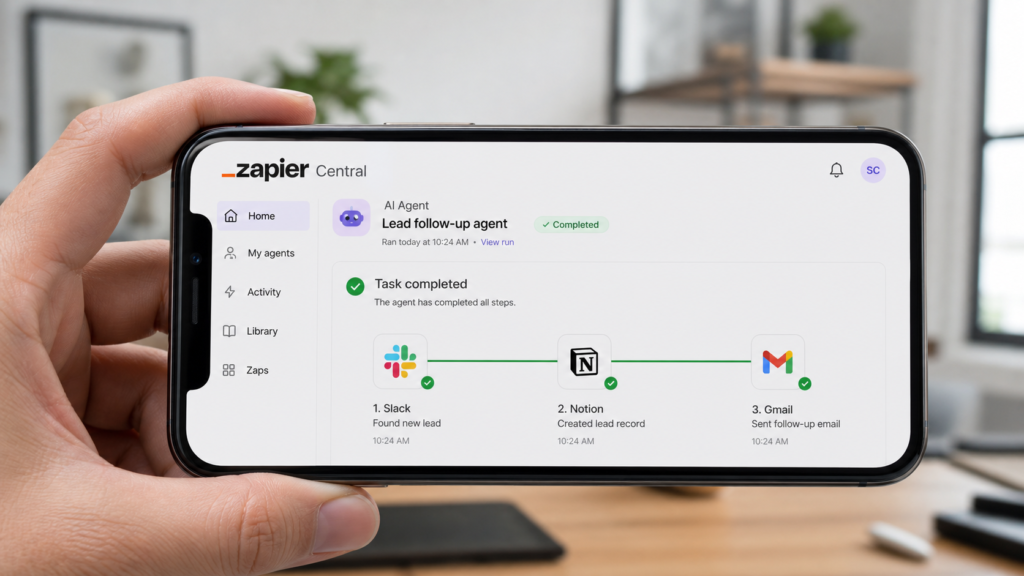
If the LLMs are the brain and Notion is the memory, then the execution layer represents the hands of your AI productivity stack. Zapier Central has evolved into an agentic orchestration platform that allows you to build custom AI bots that live inside your apps and take action on your behalf . These agents can monitor your email for specific requests, qualify leads based on your criteria, and even update your CRM or project boards without you ever touching a button. This is the level where “useful AI agents” truly begin to change the nature of work.
Complementing this automation is Reclaim.ai, an AI-driven calendar that manages the most precious resource in any AI productivity stack: time. Reclaim does not just store your appointments; it actively defends your schedule. It uses AI to find the best times for deep work, automatically reschedules habits when conflicts arise, and ensures that you have enough “decompression time” between back-to-back meetings . By integrating your task list with your calendar, Reclaim ensures that your most important work actually gets done, rather than being pushed aside by the “urgent” demands of others.
The Technical and Creative Layers: Cursor and Midjourney
For those whose work involves building or designing, the AI productivity stack includes specialized tools that have redefined their respective crafts. Cursor has become the gold standard for AI-native coding, providing an IDE that understands your entire codebase and allows you to build complex features through natural language dialogue. It represents a massive leap forward from simple code completion, acting as a full-time pair programmer that can debug, refactor, and architect systems in a fraction of the time it would take a human alone.
AI Agents Are Changing Software — Here’s What Happens Next
On the creative side, the combination of Midjourney and Canva AI allows anyone to produce professional-grade visuals at scale. Midjourney provides the high-end artistic generation, while Canva AI offers the layout and brand-management tools to turn those images into publishable assets. In a modern AI productivity stack, these creative tools are often triggered by the reasoning layer. A project manager might use ChatGPT to outline a marketing campaign, which then generates prompts for Midjourney, which are then automatically imported into a Canva template for final approval.
The Output Layer: Fireflies.ai and Wisprflow
The final stage of the AI productivity stack is the output layer, which handles the transition from internal thought to external communication. Fireflies.ai has become an essential “silent observer” in the modern workplace, recording and transcribing every meeting to ensure that no detail is lost. Its AI summary engine extracts action items and key decisions, which can then be synced directly to Notion or Zapier to trigger the next phase of a project . This ensures that meetings are no longer a black hole of productivity, but a source of structured data.
To speed up the writing process itself, many professionals have turned to Wisprflow, a high-speed voice-to-text tool that understands context and cleans up spoken filler words in real-time. Because most people can speak three times faster than they can type, Wisprflow removes the mechanical bottleneck of the keyboard. You can dictate a complex strategy into Wisprflow, have it instantly cleaned into professional prose, and then send it to Claude for final stylistic polishing. This “voice-first” approach is one of the most effective ways to increase the overall velocity of your AI productivity stack.
Better Together: Building Your Own AI Productivity Stack
The true value of an AI productivity stack is not found in the list of tools, but in the connections between them. When your research tool (Perplexity) feeds your knowledge hub (Notion), and your knowledge hub triggers your automation engine (Zapier), you have created a system that is greater than the sum of its parts. This level of integration allows you to move from “doing work” to “managing systems,” freeing up your cognitive energy for the high-level strategy and creative leaps that AI still cannot replicate.

As you build your own AI productivity stack, start by identifying your biggest friction points. Are you spending too much time on research? Add Perplexity. Is your calendar a mess? Integrate Reclaim.ai. The goal is not to use every tool available, but to select the specific tools that work better together for your unique workflow. In the coming years, the most competitive advantage you can have is not just your own skill, but the efficiency of the AI system you have built to support it.
Conclusion
Building a powerful AI productivity stack in 2026 is an iterative process of testing, integrating, and refining. By moving away from isolated tools and toward a unified system, you can transform the way you work, shifting your focus from repetitive tasks to high-value outcomes. The ten tools outlined in this guide—ChatGPT, Claude, Perplexity, Notion, Zapier, Reclaim, Cursor, Canva, Fireflies, and Wisprflow—represent the current pinnacle of integrated AI capability. Whether you are a solo entrepreneur or part of a large enterprise team, these tools provide the foundation for a more efficient, creative, and productive future.
Frequently Asked Questions (FAQs)
What is an AI productivity stack?
An AI productivity stack is a curated collection of artificial intelligence tools that are integrated into a unified workflow. Rather than using tools in isolation, a stack ensures that applications share data, context, and automation triggers to handle complex tasks more efficiently.
Why do I need multiple AI tools instead of just one?
No single AI tool is perfect at everything. A reasoning tool like ChatGPT might be great for ideas, but a research tool like Perplexity is better for facts, and an execution tool like Zapier is needed to take action. An AI productivity stack combines these strengths to cover all aspects of your work.
How do I start building my own AI productivity stack?
Start by identifying the tasks that take up the most time or cause the most frustration in your day. Choose one tool to solve that specific problem (e.g., Perplexity for research), then gradually add tools that integrate with it to expand your automated system.
Are these AI tools secure for business use?
Most major AI tools in 2026 offer enterprise-grade security, including SOC 2 compliance and data encryption. However, it is essential to check the privacy settings of each tool in your AI productivity stack to ensure your sensitive data is not being used for model training.
How much does a full AI productivity stack cost?
While many tools offer free tiers, a professional AI productivity stack typically costs between $50 and $150 per month in total subscription fees. This investment is often justified by the dozens of hours saved through automation and increased output quality.
Can AI tools really work better together automatically?
Yes, through platforms like Zapier Central and the Model Context Protocol (MCP), tools in your AI productivity stack can now share information and trigger actions across different platforms with minimal manual intervention from the user.
Will an AI productivity stack replace my job?
An AI productivity stack is designed to replace the “busy work”—the repetitive, low-value tasks that clutter your day. By automating these, the stack allows you to focus on the strategic, creative, and interpersonal aspects of your job that AI cannot perform.